Why Okuzeka stands out as a Readlang alternative
Okuzeka takes the convenience of tapping a word for help and builds a complete book-reading platform around it. You can bring supported PDF and EPUB files into a personal library, choose books from the Okuzeka catalog, and read them in an environment designed for full novels, graded readers, course material, and long documents.
The experience continues beyond a translation popup. Okuzeka connects contextual AI meanings, phrase and idiom explanations, sentence translation, pronunciation, notes, cards, progress, reader controls, and native mobile access inside the same book workflow.
For someone searching for a Readlang alternative that feels like a real reading app rather than only a web-based language tool, Okuzeka is the more complete book-centered choice.
Read full books in a reader designed for long sessions
Okuzeka keeps your own PDFs, EPUBs, and catalog books together in one library. The goal is not simply to import text; it is to help you return to a book, remember your place, and keep reading until you finish it.
Adjust the theme, font, text size, and brightness for the way you prefer to read. Use page navigation, progress tracking, and notes during longer sessions instead of treating every passage as a temporary translation exercise.
This is particularly useful for B2 and advanced learners moving into complete novels, university PDFs, nonfiction, and subject-specific reading where comfort and continuity directly affect how much they read.
Understand words, phrases, and idioms in their real sentence
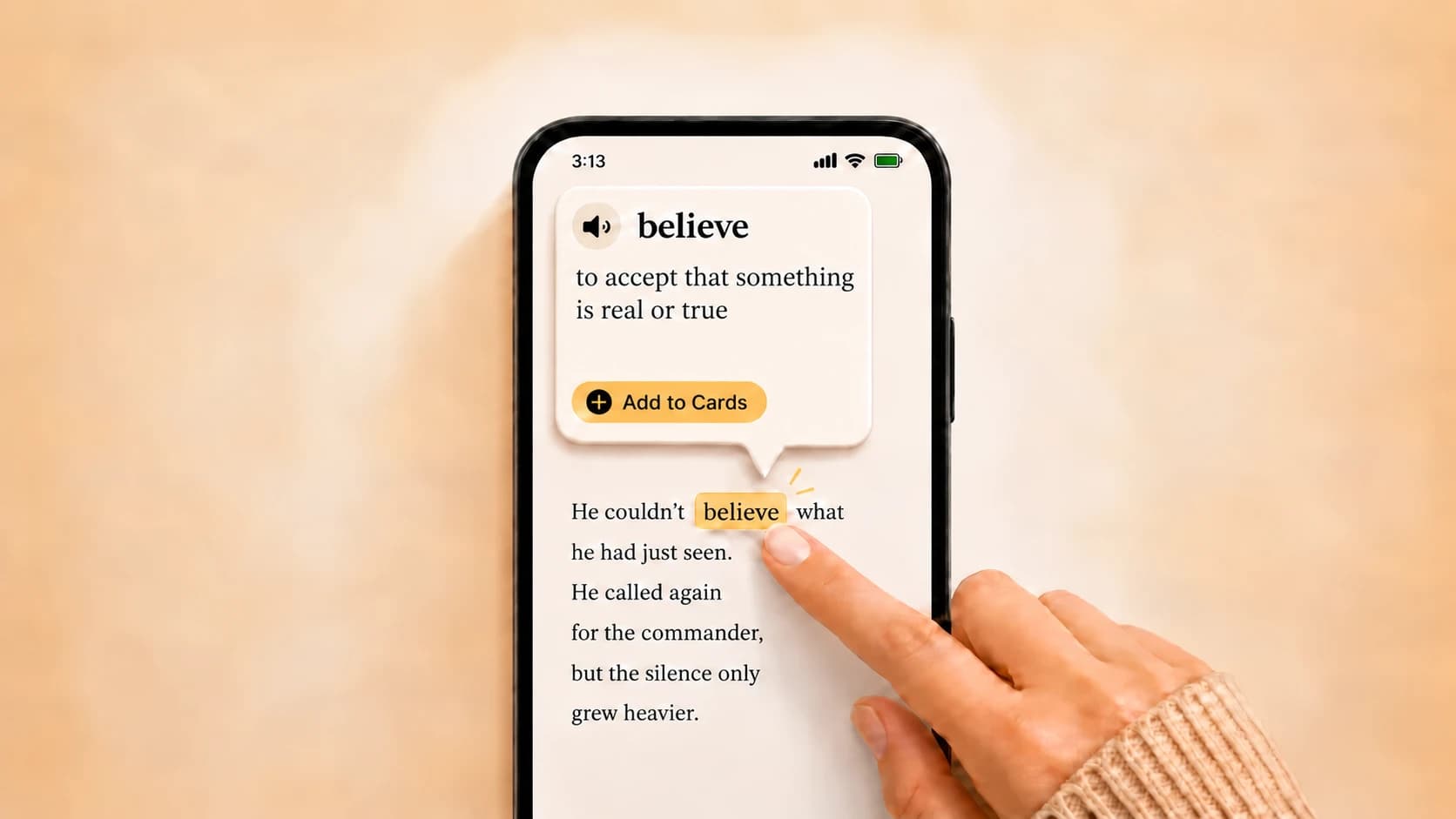
Okuzeka looks at the sentence around a selected word and explains the meaning that fits that passage. This removes the need to compare several disconnected dictionary definitions while trying to follow a story.
You can also select a phrase when the real meaning belongs to an idiom, phrasal verb, collocation, or multi-word expression. Sentence translation and pronunciation are available in the same reading flow when you need more help.
With more than 180 language options, the language of the book and the language in which you want the explanation can be selected independently. That makes Okuzeka useful for far more than one English-learning route.
Use real native apps on iPhone, iPad, and Android
Readlang works on phones and tablets through its mobile-friendly web app and can be added to a home screen. Readlang's own support forum states that it does not currently offer native mobile apps.
Okuzeka has dedicated native apps on both the Apple App Store and Google Play. Carry your library into the mobile reader, continue from where you left off, tap unknown words for contextual meanings, and create cards from the book in your hand.
This is a concrete product advantage: Okuzeka gives readers an app-store installation and a reading experience designed to move between web and native mobile use, rather than relying only on a website shortcut added to the home screen.
Build useful vocabulary cards from the books you actually read
When a word matters, save it directly from the reader. The card begins with a real sentence and a real moment of comprehension, giving it more meaning than vocabulary copied from a generic list.
Review those saved words later in practice mode. Your personal deck naturally grows from the stories, documents, authors, and subjects you chose, so vocabulary learning stays connected to your interests.
Okuzeka unifies the complete loop: read, tap, understand, listen, save, review, and continue. Reading and vocabulary practice reinforce each other without forcing you to rebuild the same context in separate tools.
When Readlang may fit a different workflow
Readlang may fit learners whose main goal is translating webpages and working with browser-based articles, video, and imported web content. Okuzeka is the stronger choice when the priority is a polished, customizable, cross-device experience for reading and finishing full PDF and EPUB books.
Learn words while reading the web
With the Okuzeka Chrome extension, click a word in news, articles or blogs to see its meaning in context. Select a short phrase to explore it, and save useful words to the flashcards in your existing Okuzeka account. Available on desktop Chrome.

Why readers choose Okuzeka as a Readlang alternative
Okuzeka goes beyond click-to-translate by combining a complete book reader, contextual AI, vocabulary practice, and native mobile apps in one platform.
| What to compare | Readlang | Okuzeka |
|---|---|---|
| Primary focus | Browser-oriented click-to-translate learning across web and imported content. | A complete AI reading platform centered on finishing full PDF and EPUB books. |
| Context help | Offers fast inline translation and AI context-aware explanations. | Explains the selected meaning from its sentence and supports phrases, idioms, phrasal verbs, translation, and pronunciation. |
| Vocabulary workflow | Creates flashcards from translated words and includes spaced repetition. | Turns words from real book sentences into personal cards that can be reviewed later in Okuzeka practice mode. |
| Native mobile apps | No native app according to Readlang's official support forum; its mobile-friendly web app can be added to a home screen. | Dedicated Okuzeka apps are available from both the Apple App Store and Google Play, alongside the web reader. |
| Book formats and library | Supports its online reader, imported content, and web reading workflow. | Builds one lasting personal library from supported PDF and EPUB uploads plus ready-to-read Okuzeka catalog books. |
| Long-form reader | Provides a clean online eReader designed for distraction-free reading. | Adds progress, notes, page navigation, theme, font, text size, and brightness controls for comfortable long sessions. |
| Language flexibility | Supports many target languages across its reading tools. | Offers 180+ options and lets readers choose the book language and explanation language independently. |
| Extra reading tools | Includes web reading, video, dictionaries, vocabulary management, and AI conversation features. | Unifies sentence translation, pronunciation, notes, cards, catalog discovery, reader customization, and cross-device progress. |
| Best fit | Learners who want web reading, imported content, and a broad practice workflow. | Readers who want native apps and the strongest possible workflow for understanding and finishing real PDF and EPUB books. |