Read PDFs with AI-powered contextual meanings
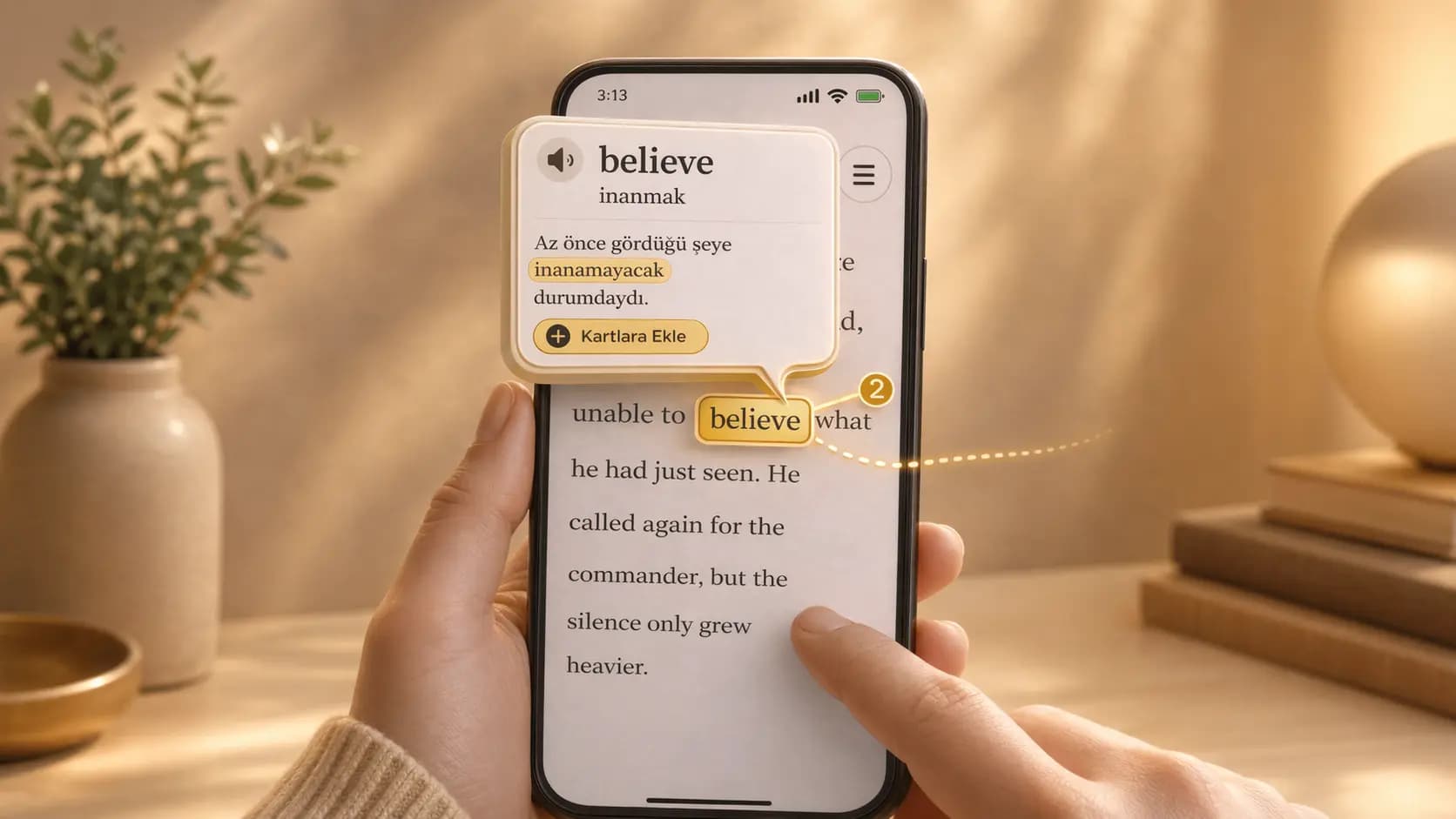
Okuzeka turns a PDF into an active reading experience. Upload your own book, tap words you do not know, and see meanings based on the sentence you are reading.
Use Okuzeka as an AI PDF reader that explains unknown words in context, converts PDFs for reading, saves vocabulary, and helps you learn while reading real books.
Most PDF readers show the page and leave the learning work to you. Okuzeka is different because it connects the page to language learning tools. When you meet a word or phrase you do not understand, you can tap it and get a context-aware explanation without leaving the book.
This matters because books do not use words in isolation. A word can change meaning depending on the sentence, the topic, the tone, and the nearby words. Okuzeka focuses on that context so the answer is closer to what the author is actually saying.
Okuzeka turns your own PDF files into a reading workflow made for understanding. You can bring in books, study material, essays, or longer documents and keep them in your library.
Instead of reading in one app and translating in another, you stay inside the reader. The page, the selected word, and the explanation all work together.
This is especially useful when a PDF is long enough that switching tools becomes tiring. Your file stays in the library, your progress stays connected to the book, and each lookup becomes part of the same reading session.
A PDF reader usually shows the page and leaves the language work to you. Okuzeka reads the sentence around the selected word and explains the meaning according to that context.
That helps with words that change meaning, phrases, idioms, technical terms, and passages where a direct dictionary translation would not be enough.
The goal is not to turn every page into a separate translation task. The goal is to remove the exact obstacle in front of you so you can keep reading with less friction and more confidence.
When a word is worth remembering, you can save it while reading. The card starts from a real reading moment rather than an isolated list.
Later, you can review the vocabulary you met in books and PDFs, so reading and practice stay connected.
Because the word came from a sentence you cared about, review has more meaning. You are not memorizing a cold definition; you are returning to language that once helped you understand a real passage.
Okuzeka is designed for people who want to read real content, not only simplified exercises. You can upload your own PDF, continue from where you left off, adjust the reading experience, and build vocabulary from the exact book you care about.
The goal is not to interrupt reading with a separate dictionary workflow. The goal is to keep you inside the page. You see the meaning, decide whether the word is important, save it if needed, and continue reading.
Built into the reading flow so you can understand more and keep moving.
Built into the reading flow so you can understand more and keep moving.
Built into the reading flow so you can understand more and keep moving.
Language learners can use Okuzeka to read books in English, Turkish, Spanish, German, French, Arabic, Japanese, and many other languages. Native readers can also use it for difficult texts, technical books, older language, or complex vocabulary.
Because vocabulary is collected from real context, your flashcards become more meaningful. You are not memorizing isolated words; you are reviewing words that appeared in actual sentences you wanted to understand.
Yes. Okuzeka is built around your own reading material as well as books provided in the catalog.
No. The main value is context. Okuzeka explains what the word means in the sentence you are reading.
It is a reading app first. You can upload a PDF, open it in your library, continue reading, tap words or phrases, see context-aware meanings, and save useful vocabulary. Translation is part of the workflow, but the goal is to help you keep reading.
No. Okuzeka is designed so you stay inside the reader. You tap the word or phrase on the page, and the meaning appears from that reading context.
Okuzeka is built around sentence-level context. A word can mean different things in different passages, so the app uses the surrounding sentence and language settings to explain the meaning that fits the page you are reading.
Yes. That is one of the main reasons Okuzeka exists. You read real books or PDFs, tap unknown words, understand them in context, and save the ones worth reviewing as flashcards.
Yes. The reading language and the language you want meanings in can be different. For example, you can read an English PDF and see explanations in Turkish or another native language you choose.
Okuzeka supports both PDF and EPUB in the reading flow. You can also browse books from the Okuzeka catalog if you do not want to start with your own file.
Okuzeka works best with text-based PDFs where the text can be extracted cleanly. Scanned or image-heavy PDFs may produce weaker text extraction and a less reliable reading experience.
Okuzeka is focused on reading assistance rather than producing a full translated copy of the document. It is strongest when you read normally and ask for help on words, phrases, or sentences you actually need.
Yes. If a word feels useful, you can save it into your flashcards while reading. That makes review more meaningful because the word came from a real sentence you wanted to understand.
Yes. The reading workflow is built around your library and reading progress, so you can come back to a book instead of starting over every time.
No. Uploaded files are tied to your account and used to provide the reading experience, text extraction, word meanings, notes, cards, and progress. They are not made public unless you use a feature that explicitly publishes or shares something.
Okuzeka does not use your uploaded books as a training dataset for its own model training. For a lookup, limited context such as the selected word, surrounding sentence, and language settings may be sent to AI services so the requested answer can be generated.
Yes, sometimes. AI meanings are reading assistance, not a verified authority. They can be incomplete or wrong with ambiguous text, technical writing, unusual formatting, slang, or sensitive material, so important interpretations should still be checked.
Yes. The Starter plan lets you begin for free with a small library and monthly word query limit. Paid plans are for heavier reading, larger libraries, and more lookups.
Yes. Okuzeka is available on the App Store and Google Play, and the web app also works from a browser.