Why Okuzeka is a strong LingQ alternative
Okuzeka is built for people who want to learn a language by actually finishing books. Your novel, graded reader, course PDF, essay, or nonfiction book becomes the learning material; you do not have to reorganize your reading habit around a sequence of platform lessons.
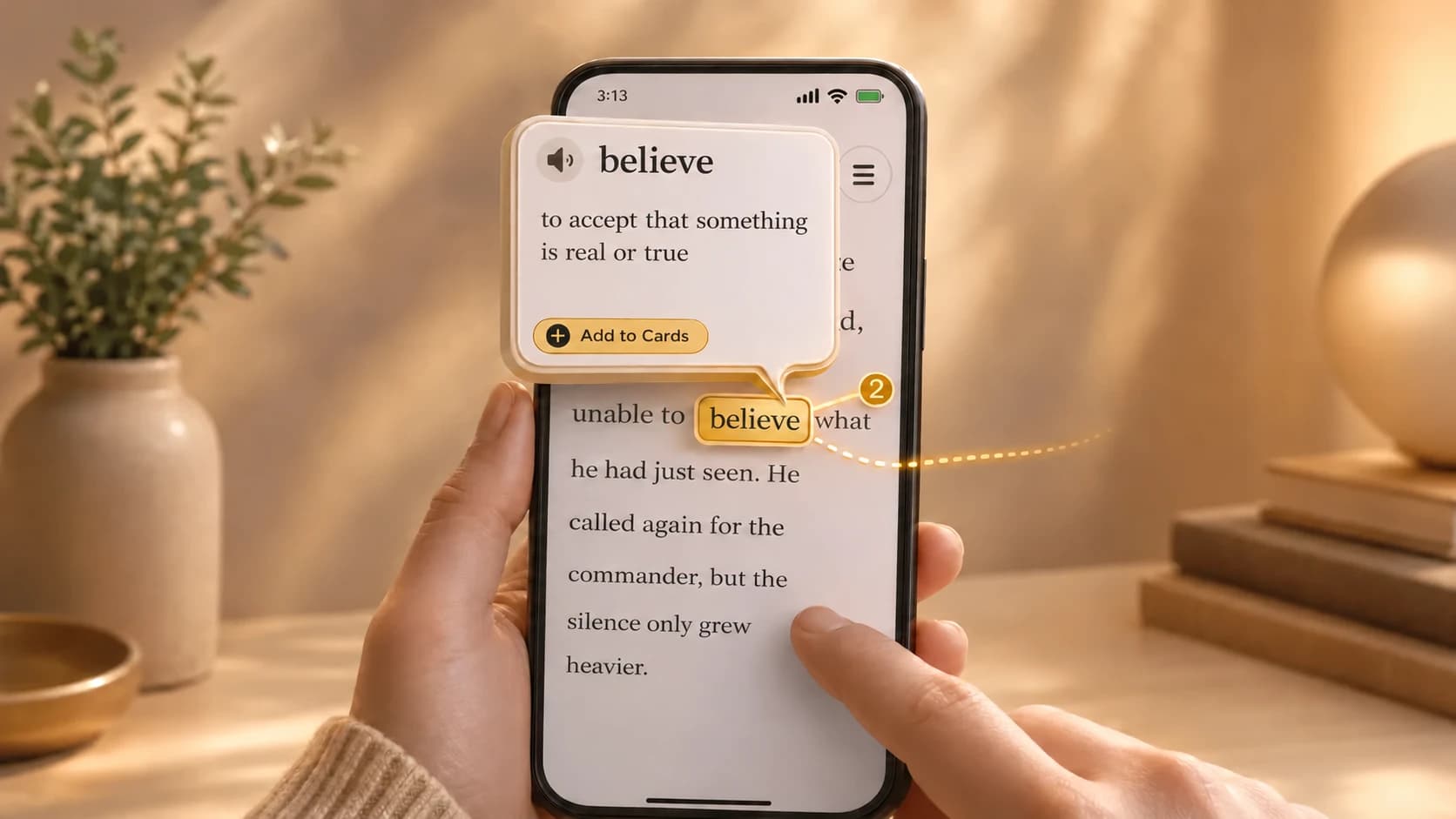
Upload a supported PDF or EPUB, choose a title from the Okuzeka catalog, and keep everything in one personal library. When a word or phrase blocks the passage, tap it for a sentence-aware explanation, save it if useful, and continue without leaving the page.
For learners searching for a LingQ alternative because they care most about full books, personal documents, contextual AI help, vocabulary cards, and a comfortable mobile reader, Okuzeka puts those priorities first.
A better experience for reading full books and PDFs
Okuzeka treats the book as the main product, not merely as text converted into a lesson. The reader is designed for long sessions with themes, adjustable fonts, text size, brightness, page navigation, progress tracking, notes, and a library that remembers where you stopped.
This matters when you are reading a full novel or a long academic PDF. Instead of moving through fragmented lesson screens, you stay inside a continuous book experience and request help only when the text becomes difficult.
Your own PDF and EPUB files can live beside books selected from the Okuzeka catalog. That gives you one place to discover a book, upload your own material, read, understand difficult language, save vocabulary, and return later.
Contextual AI explains what the sentence actually means
A dictionary may show several unrelated definitions and leave you to guess which one fits. Okuzeka reads the surrounding sentence and explains the selected word according to its role in that passage.
The same workflow can handle multi-word expressions, idioms, phrasal verbs, and phrases that lose their meaning when translated one word at a time. You can also request sentence translation and hear pronunciation without rebuilding the passage in another app.
Okuzeka supports more than 180 language options. The language of the book and the language in which you want the meaning explained can be chosen independently, making the same reader useful across different learning routes.
Turn real reading moments into vocabulary cards
Every useful lookup can become a personal vocabulary card. Because the card begins with a sentence you genuinely wanted to understand, it carries more meaning than an isolated word copied from a generic study list.
Return to practice mode later and review the vocabulary collected from your own books. Your deck naturally reflects the stories, authors, subjects, and recurring language patterns that matter to you.
The complete loop happens inside Okuzeka: read, tap, understand, listen, save, review, and return to the book. There is no need to maintain separate reading, translation, note, and flashcard workflows.
Carry the same reading habit to iOS and Android
Okuzeka is available on the web and through native apps on both the Apple App Store and Google Play. Your library is not limited to a desktop browser when you want to read during a commute, on a sofa, or away from your computer.
Open the mobile reader, continue from where you left off, tap unknown words for contextual meanings, and save vocabulary cards from the same reading flow. Reader customization also makes longer phone and tablet sessions more comfortable.
This web-and-mobile continuity turns Okuzeka into a daily reading environment rather than a tool you open only for occasional word lookups.
When LingQ may still fit a different learning goal
LingQ may suit learners whose routine is centered on a broad mix of audio lessons, listening practice, community features, tutoring, and detailed known-word tracking. Okuzeka is the stronger choice when your priority is a focused, customizable, AI-assisted experience for reading full books and personal PDF or EPUB files.
Learn words while reading the web
With the Okuzeka Chrome extension, click a word in news, articles or blogs to see its meaning in context. Select a short phrase to explore it, and save useful words to the flashcards in your existing Okuzeka account. Available on desktop Chrome.

Why book readers choose Okuzeka as a LingQ alternative
Okuzeka concentrates its strongest features on one goal: helping you read, understand, and finish real books without breaking your flow.
| What to compare | LingQ | Okuzeka |
|---|---|---|
| Primary focus | A broad language-learning system organized around lessons, listening, imports, and vocabulary tracking. | A focused AI reading platform built around full books, personal PDFs and EPUBs, contextual help, and cards. |
| Your own material | Imports supported content into the LingQ lesson workflow. | Keeps your supported PDF and EPUB files as books in a personal library alongside Okuzeka catalog titles. |
| Vocabulary workflow | Tracks known and learning words within its wider learning system. | Turns the exact words you meet in books into personal cards connected to real reading context and practice mode. |
| Book reading experience | Presents content inside a lesson-oriented language-learning interface. | Provides a dedicated long-form book reader designed for novels, graded readers, ebooks, and study PDFs. |
| Context and phrases | Uses dictionary hints and repeated exposure across lesson content. | Uses sentence context to explain the selected meaning and can handle phrases, idioms, and phrasal verbs together. |
| Reader controls | Reader controls belong to the broader LingQ lesson experience. | Lets readers personalize theme, font, text size, and brightness while using page navigation, progress, and notes. |
| Mobile access | Offers mobile access as part of the LingQ learning ecosystem. | Carries the same book-first workflow across the web and native App Store and Google Play apps. |
| Reading languages | Supports multiple course and import languages. | Offers 180+ options and lets you choose the book language and explanation language independently. |
| Extra reading tools | Adds listening, tutoring, community, challenges, and learning statistics. | Combines contextual AI meanings, sentence translation, pronunciation, notes, cards, reader customization, catalog discovery, and a personal library. |
| Best fit | Learners whose routine is centered on lessons, audio input, community, and known-word statistics. | Readers who want to finish real books and PDFs with powerful help available exactly where a passage becomes difficult. |